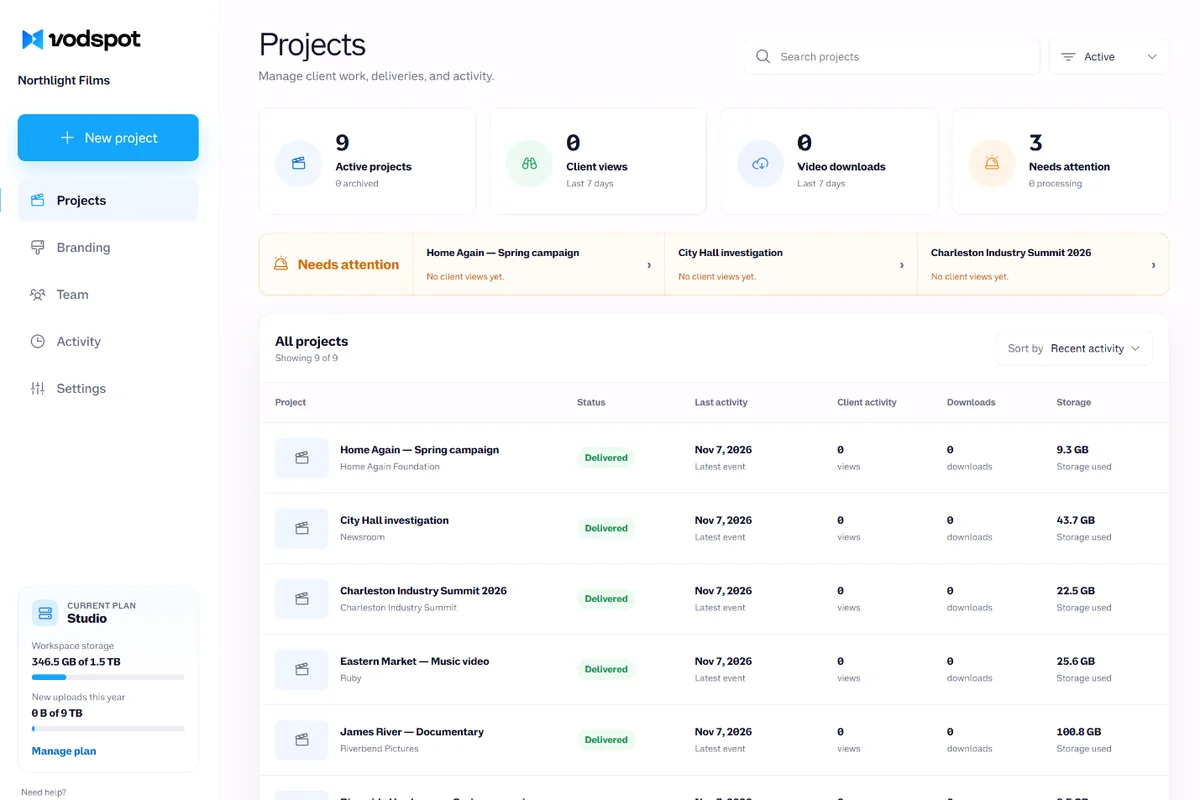
A project for every client job
Videos, pages, stats, and history live in an agency project, not in someone’s personal folder. The Client field and tags find everything in seconds.
For agencies
Video hosting for agencies is one place for all your clients’ videos. Each client lives in their own project, their videos play only on their websites, your team works by roles, and the report for the next meeting is ready when you are. Videos are private by default, the player is ad-free, and you don’t pay for views.
✓ 7-day free trial 5 GB included No credit card

Why agencies use VodSpot
Videos, pages, stats, and history live in an agency project, not in someone’s personal folder. The Client field and tags find everything in seconds.
The agency’s logo, name, and font are on every page. Layout, colors, and cover are set per page, in the client’s style.
Pages and player on your own address, like video.youragency.com, with HTTPS. On Pro and Studio.
Admin runs the settings, Editor runs projects, Viewer watches. If someone leaves, you remove their seat, and the videos stay with the agency.
Up to 25 approved domains on every plan. Copied embed code won’t play anywhere else.
Views, viewers, completions, embedding sites, and a CSV for every project, on Pro and Studio.
The client side
The client’s marketing director doesn’t need another account. They don’t need your folder tree with “spot_v7_FINAL_fix2” either. They want the video to play on their website and the right version to sit at one link, even three years later.
Video hosting for agencies at VodSpot gives each client their own shelf: a project with videos for the website, pages for their team, and stats. The player sits on the client’s site with no ads, no third-party trackers, and no “related videos” at the end, so viewers don’t leave your video to watch someone else’s. The step-by-step handoff of the final cut is covered separately on the video delivery for agencies page.
The client sees their work. Your kitchen stays in the kitchen.
The math
Total $5,664 per year
Total $1,490 per year
$4,174 less (−74%)
Prices before tax, from vidyard.com/pricing, help.vimeo.com, and the VodSpot pricing page, checked November 2, 2026. For teams of five or more, Vidyard offers Teams (“Best for teams of 5+”) at a custom price. Vimeo Studio is $400 per month billed annually, or $4,800 per year for 10 seats: VodSpot Studio costs $3,310 (−69%) less. Vimeo does give you 10 TB to our 1.5 TB. If your library needs 3 TB, add six 250 GB blocks for $1,500 per year: $2,990 in total, still $1,810 (−38%) less. We don’t win on terabytes. We win because the ninth and tenth people on the team cost nothing extra.
Video hosting for agencies, explained
Video hosting for agencies is a hosting service that keeps every client’s videos in one place, delivers them to client websites and teams, and outlasts staff turnover inside the agency.
That last part sounds like a detail until you look at the timescale. In April 2025, the ANA (the Association of National Advertisers) and the 4As (the American Association of Advertising Agencies) released a joint study on how long clients stay with their agencies. The average client works with its agency of record for 6.78 years. The previous study, in 2016, put it at 3.2 years. And the agencies that answered the 4As named a full seven years for their largest clients.
Seven years is several generations of staff. By year five, the producer who shot a client’s first video works somewhere else. Their laptop has been handed back and wiped. And then the client calls and asks for that 2021 video, “the one that was on the homepage.”
Meet Rosa. She runs a creative agency in Raleigh: eight people and fourteen clients, from a credit union to a brewery in Durham. She’s worked with some of them since year one. Videos used to live wherever they were made: some in a producer’s Dropbox, some on Vimeo, some on an external drive with a “Brewery 2022” sticker.
Now Rosa has one workspace and a project for every job: “Credit Union — Spring Campaign,” “Brewery — Taproom Loop.” The Client field holds the client’s name, so one search pulls up the whole history. Website videos are embedded from the same place, and the exact originals sit right next to them: the very files you exported, with no recompression. When a client starts a new campaign, Rosa duplicates the last project, and its pages arrive as drafts with the same client layout and colors.
Agencies change people. A client’s library shouldn’t change with them.
In 2014, Osterman Research surveyed 379 office workers for Intermedia, a company that sells cloud services to businesses. Of those who had left a job, 89% still had access to at least one app from their former employer. And 68% kept work files in a personal file-sharing service, the very same Dropbox. The study is old and vendor-funded, but any agency will recognize itself in it.
It happened to Rosa last spring. A producer left, and the folder with the brewery’s videos went with her: it lived in her personal Dropbox. Three weeks of emails, and half the files never came back. We’ve broken down how folders like this leak in a separate analysis with the numbers.
Video hosting for agencies solves this with a system, not with discipline. At VodSpot, each person has a seat and a role:
A freelance editor gets the Editor role for one campaign, and after the handoff you remove them from Team. Their access ends at once, but projects, videos, pages, and stats stay in the workspace, because they belong to the agency, not the person. On Studio, the activity log keeps 12 months of records: who published or unpublished a page, who was invited to the team, and which files the client downloaded.
Seats are simple: Pro has 3, Studio has 10, and every member, including the owner, takes one. There’s no SSO sign-in yet: if a big client’s IT department requires it, plan for that up front.
A password everyone knows belongs to no one. A seat belongs to the agency.
A video on a client’s homepage is your work, on display every day. And if it slows the page down, that’s on you too. Video hosting for agencies has to cover both sides.
How much this matters was shown by “Milliseconds Make Millions,” a 2020 study that Deloitte Digital and the agency 55 ran for Google. They tracked 37 brand sites across Europe and the U.S. for 30 days, more than 30 million sessions in all. Making a mobile site just 0.1 seconds faster brought retailers 8.4% more conversions and travel sites 10.1% more. A tenth of a second. Less than a blink.
That’s why VodSpot’s embed code ships with loading="lazy": if the player sits below the first screen, the browser doesn’t load it until the visitor scrolls down to it. The stream adapts to the connection speed, up to 4K. For the brewery, Rosa set up a loop on the taproom’s website: autoplay, muted, on repeat, no controls.
The second rule: a client’s video plays only on the client’s site. Every VodSpot plan, trial included, has a list of approved domains: up to 25, and *.client.com covers all subdomains at once. Copied embed code won’t play anywhere else. There’s one list per workspace, so all your clients share those 25 domains. The Owner and Admins can edit it, and analytics show where the video is actually embedded (Embedded on).
Others work differently. Wistia’s domain restrictions “apply to your entire account,” and its help page adds: “You must be an Account Owner to enable domain restrictions.” Vidyard’s Domain Playback Restrictions come only with Teams and Enterprise, both priced on request. Vimeo’s help center says you can list up to 50 domains for a video. For more on embed security, see how to embed a private video on your website, and for a head-to-head of the two big names, see Wistia vs. Vimeo.
The client pays for a video on the homepage, not for a homepage that loads slower.
In May 2025, Gartner published a survey of 402 CMOs from North America, the UK, and Europe. Marketing budgets were flat at 7.7% of company revenue, and 59% of CMOs said they didn’t have enough money to deliver their strategy. And 39% planned to cut agency budgets.
When budgets shrink, the first line to go is the one nobody can account for. Video often lands there: “they made a video, it’s sitting somewhere.” So video hosting for agencies without reports is just a warehouse.
The credit union is Rosa’s biggest client, and they hold a quarterly review. Rosa used to bring screenshots from three services. Now she opens the project, picks 90 days, and exports a CSV. It shows views and unique viewers for every video, average completion, watch time, downloads, and clicks on the player’s call-to-action button. It also lists the countries, devices, and sites where the video is embedded. Your team’s own views don’t count, so your own checks don’t inflate the numbers.
Full analytics and CSV export come with Pro and Studio; Solo shows views and downloads only. Reports are per project: there’s no single file covering all fourteen clients. A weekly summary does land in your inbox every Monday when there was activity, though. We’ve rounded up the other video metrics on the video analytics page.
Predictability matters for your own bill too. VodSpot plans are priced by storage, with no bandwidth fees: if a client’s video suddenly goes viral, your bill stays the same. Wistia’s FAQ says plainly that you “pay for usage beyond what your plan includes.”
Numbers won’t save a weak video. But without them, you can’t defend a strong one.
Questions to ask any service before you trust it with seven years of a client relationship:
Here’s what VodSpot’s video hosting for agencies doesn’t have: frame-accurate review comments (for review, use Frame.io), live streaming, SSO, or a public API. If you need those, see our business platform review and Vimeo pricing analysis. Plans and seats are on the pricing page.
Clients stay with an agency for years. Choose a host that will stay with you just as long.
FAQ
One that keeps client videos private, outlasts staff turnover, and puts videos on client websites without ads. Video hosting for agencies at VodSpot means a project for every job, seats with roles, embeds only on approved domains, and CSV reports.
Yes, that’s what video hosting for agencies is for. Each client job is a separate project with its own videos, pages, passwords, and analytics, and the Client field and tags pull up a client’s whole history.
Partly. The logo, brand name, font, and domain are set once per workspace: that’s the agency’s brand. Each page has its own layout, colors, cover, and language, so you can dress it in the client’s colors. If a client wants their own logo and domain, they can open their own VodSpot workspace and invite your team as Admin or Editor (invites start on Pro).
Pro has 3 seats, Studio has 10, and every member, including the owner, takes a seat. If the library grows but the team doesn’t, add 250 GB blocks of storage for $25 a month each. Details are on the pricing page.
Yes, on Studio. The activity log records who published, unpublished or deleted a page, who invited a member or changed their role, and which files the client downloaded. Records are kept for 12 months.
Nothing. You remove the person from Team and their access to the workspace ends, but the projects, videos, pages, and stats they worked on stay with the agency. Links and embeds on client websites keep working.
Yes, on every plan, trial included: up to 25 domains in the workspace settings, and *.client.com covers subdomains. The player won’t open on other sites. The list is shared by all clients in the workspace.
When your subscription ends, the workspace goes read-only for 14 days, and public links and embeds pause. Renew within those days and everything comes back. After that, projects, videos, and pages are deleted, but your account stays. Before you leave, download the originals: they’re the exact files, not recompressed.
Guides
Embeds
Unlisted isn’t private, and hiding a video URL isn’t security. Here is how to put a video on your site so it only plays where — and for whom — you intend.
Read the guidePrivate sharing
Wistia, Vimeo or YouTube? A fair head-to-head: prices, free plans, ads, lead capture, analytics, privacy and original downloads — plus who should pick which, and when you need none of them.
Read the guideBusiness
VodSpot, Vimeo, Wistia, SproutVideo, Vidyard, Panopto, Brightcove, and Kaltura: what are the differences, how much do they cost, and which one is right for your team?
Read the guideFor agencies
Start with seven days and 5 GB. No credit card required.