Roles and seats
Owner, Admin, Editor, and Viewer: 3 seats on Pro, 10 on Studio. A freelancer gets exactly the rights they need for three weeks.
For production companies
Video hosting for production companies is where your productions live after export: client finals and packages, screeners for distributors, and the masters a client will come back for in three years. Every production gets its own project, your team and freelancers get their own roles, and the delivery page carries your logo and domain. No ads, no charge per view.
✓ 7-day free trial 5 GB included No credit card

Deliverable packages
Meet Olivia. She runs a twelve-person production studio in Richmond. Corporate films for hospitals and banks, a couple of commercials a month, and a documentary about the James River that a sales agent is showing to buyers right now. About forty productions a year—and not one of them ends with a single file.
A corporate film has a master for the big screen, a subtitled version for the website, and a short cut for social media. A documentary has the film itself, a trailer, three press clips, and a package for a broadcaster. All of it has to arrive in a way that leaves the client no guessing about which file is final.
Good video hosting for production companies turns all of that into a single delivery page. On VodSpot, that’s up to 100 videos in the right order, each with a clear title, streaming in up to 4K right in the browser, and the exact original to download wherever you’ve allowed it. Your team sees what was opened and what was downloaded. If it’s a commercial with dozens of cuts for different platforms, that’s covered on the commercial video delivery page.
Your client never saw the timeline. They’ll remember whether they found the final cut on the first try.
Run it as a team
Owner, Admin, Editor, and Viewer: 3 seats on Pro, 10 on Studio. A freelancer gets exactly the rights they need for three weeks.
Videos, delivery pages, analytics, and notes in one place, with client search, tags, and an archive.
Your logo, colors, and defaults—password, expiry date, layout, client message—fill in on every new page.
Pages open from an address like screening.yourcompany.com on Pro and Studio, and access-code emails come from your company’s name.
Viewer email sign-in from Pro; the viewer-email watermark and country restriction on Studio.
Who published, unpublished, or downloaded, with the name and date. The log is open on Studio, and records are kept for 12 months on every plan.
Video hosting for production companies, explained
Video hosting for production companies is hosting that handles the business, not just a single film: delivering work to clients, giving the right people access, and keeping masters safe for years.
For a freelancer, it’s simple: shoot, edit, send. For a studio, it’s a constant flow. On Monday, Olivia delivers a spot for a car dealership. On Tuesday, a broadcaster asks for the documentary package. On Wednesday, a former client is looking for the master of a 2023 corporate film, and the editor who cut it left the studio two years ago.
Usually, this runs on three tools: a file-transfer service for delivery, a cloud folder for the archive, and one shared login for everyone. Together, they produce what Olivia has seen many times: the link has expired, the folder is open to “anyone with the link,” and no one remembers which file is final. What cloud storage security data shows explains why cloud folders are a poor fit for client video.
In VodSpot, every production is its own project: videos, several delivery pages with their own links, analytics, and history. The dashboard has a “needs attention” section: a page the client hasn’t opened 24 hours after publishing, a link that expires in three days. A producer sees forty projects, not forty email threads.
One film is a project. Forty films a year is a business, and it needs order.
A screener is a prerelease link to a film for the people who decide its fate: sales agents, distributors, and broadcast buyers. A leak at this stage costs the most.
Someone has done the math. In 2014, economists Liye Ma, Alan Montgomery, Param Vir Singh, and Michael Smith of Carnegie Mellon University and the University of Maryland compared major U.S. releases and published the results in the journal Information Systems Research. Films that leaked online before release earned, on average, 19.1% less at the box office than films pirated after release. The paper opens with “The Expendables 3”: a DVD-quality copy leaked three weeks before the premiere and was downloaded about 5 million times, and the opening weekend brought in $16.2 million—$10 million (38%) below expectations.
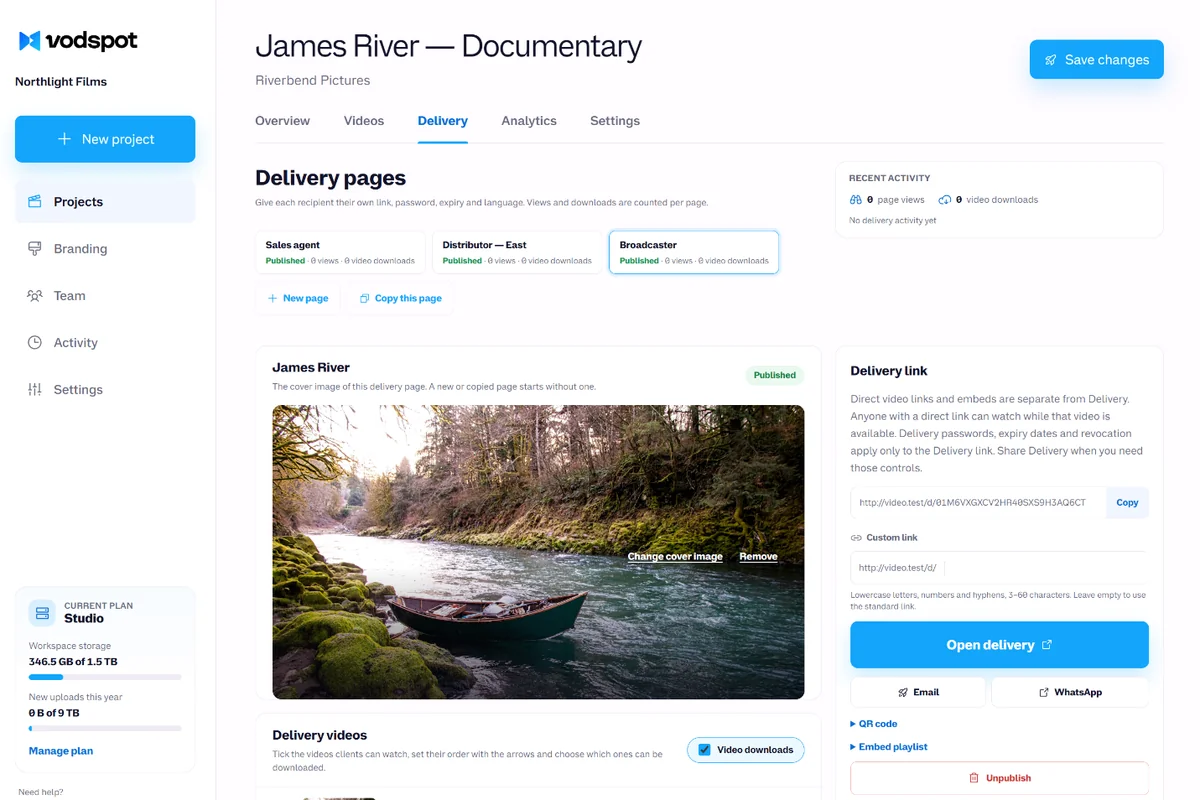
A shared password won’t stop this: it travels with the link. That’s why video hosting for production companies gives each recipient their own page. Olivia’s James River film has three: one for the sales agent and one for each of two distributors. A single “Copy this page” click copies the videos, the access settings, and the design. Access is by email sign-in: the viewer enters their address and the one-time code from the email, and the “Who opened it” list shows who opened the page and how many times they watched. On Studio, the viewer’s confirmed email floats over the picture, even in full screen, and country restriction blocks territories where the rights haven’t been sold yet. Turn downloads off for screeners: the watermark isn’t on the downloaded original. The types of watermarks and what each one actually prevents are covered in what is a video watermark.
A distributor passed? Unpublish their page: the link stops working at once, an open player stops within about a minute, and the other pages keep working.
You can’t lock a screener forever. But you can sign every copy.
Half of a production team is temporary. A colorist for a week, a second editor for a month, a motion designer for two spots. And each has their own hard drive.
In 2012, the Science and Technology Council of the Academy of Motion Picture Arts and Sciences surveyed independent filmmakers and documentarians for its report “The Digital Dilemma 2.” Eighty-one percent kept at least some of their footage and finished work on hard drives. More than 60% had never migrated their digital files to new media, and only 8% did so regularly. The report tells of a director who spent seven years on a feature, screened it once, and a week later the drive died. The only copy left was a compressed DVD.
For a studio, this isn’t just a technical problem. If the final lives on a freelancer’s drive, it leaves with the freelancer. Video hosting for production companies changes where it lives: the master goes into the company’s project, not into someone’s personal folder.
At Olivia’s studio, it works like this: a freelance editor gets an invitation with the Editor role for a three-week job. They upload videos, build and publish delivery pages, add subtitles and chapters—but they can’t delete the project, manage billing, or touch the branding. The project is delivered: Olivia removes them from the team, their access ends, the videos stay with the company, and the seat is free for the next person. On Studio, the activity log shows who published, unpublished, or downloaded what.
Freelancers move on. Masters should stay.
A studio’s most valuable asset isn’t its cameras. It’s the library: everything you’ve shot over the past ten years, and everything clients will come back for.
Film history shows what neglect costs. In 2013, the Library of Congress and the Council on Library and Information Resources published a study by film historian David Pierce: of 10,919 American silent feature films made from 1912 to 1929, only 14%, or about 1,575, survive in their original form. Flammable nitrate film isn’t the only culprit. Pierce points plainly to “the industry’s practice of neglecting or destroying prints and negatives.”
Going digital didn’t solve the problem. Back in 2007, the same Academy council calculated in its report “The Digital Dilemma” that storing a digital 4K master costs about $12,514 a year, compared to $1,059 for a film master—“an 11-fold difference.” Drives have gotten cheaper since then, but the key conclusion stands: a digital archive needs ongoing spending, or it becomes unusable.
Video hosting for production companies turns that expense into a clear line in the budget. VodSpot prices plans by storage, with no bandwidth fees in normal use: Studio is 1.5 TB for $1,490 a year, and each extra 250 GB is $25 a month. When one of Olivia’s former clients asks for a master, she doesn’t dig through a closet for a drive. She opens the project and delivers the exact original—same filename, no re-encoding.
Two rules. Keep another cold copy on LTO or in a second cloud: VodSpot is the archive clients can reach in minutes. And remember that the archive is part of your subscription: when it ends, you get 14 days read-only, and then projects and videos are deleted. The difference between hosting and cloud storage is covered in video hosting or cloud storage, and how professionals keep film archives is in video hosting for film schools and cinematheques.
Silent films weren’t lost because nobody knew how to keep them. They were lost because nobody thought they were worth keeping.
Before you trust a service with your whole studio’s work, ask these questions:
Now the numbers: a team of 10, paying annually. Video hosting for production companies on VodSpot is Studio at $1,490 a year: 10 seats and 1.5 TB of storage. Frame.io Team is $264 per member a year on annual billing, $2,640 for ten: VodSpot is $1,150 (−44%) less, though for frame-accurate review, nothing beats Frame.io. Vimeo Studio is $400 a month billed annually, or $4,800, with 10 seats and 10 TB of storage: VodSpot is $3,310 (−69%) less. MediaSilo Team starts at $15 per user per month, or $1,800 a year for ten users: a $310 (−17%) difference, but MediaSilo’s top plan adds forensic watermarking and SSO.
Need 3 TB of storage? Studio plus six 250 GB blocks is $2,990 a year, still $1,810 (−38%) less than Vimeo Studio. Vimeo gives you more storage for the money; VodSpot costs less per team. The best video delivery platforms review compares ten of them side by side, and every plan is on the pricing page.
Pay for what you keep, not for how many people are on the team this month.
FAQ
Most send a transfer link or a shared folder. Video hosting for production companies like VodSpot puts every version on one branded page: the client streams in 4K, downloads the exact masters, and you see what was downloaded.
Pro includes 3 seats and Studio 10, with Owner, Admin, Editor and Viewer roles, so a freelancer gets exactly the rights they need. See the pricing page.
Count the size of your masters: originals are what take up the space. In VodSpot’s video hosting for production companies, Studio gives you 1.5 TB, and each extra 250 GB block costs $25 a month. On an annual plan, you can upload up to six times your storage for the year up front, so the archive moves over in one go.
Yes, on Pro and Studio: delivery pages open from your address, and emails with access codes are sent in your company’s name. See white-label video hosting.
Give each recipient their own page, turn on viewer email sign-in and an expiry date, and switch downloads off. On Studio, add the viewer-email watermark and a country restriction. If one recipient passes, unpublish their page; the others keep working. See secure video sharing.
Remove them from the team and their access to the workspace ends immediately, while every video and page they uploaded stays with the company. As Editors, they couldn’t delete projects, manage billing or change branding in the first place.
For final delivery and the archive, yes. For frame-accurate review, no: VodSpot has no time-coded comments on the frame. Many studios review in Frame.io and deliver finals from VodSpot. See the Frame.io alternative.
The workspace stays read-only for 14 days with public links paused, so you can still download every original. After that, projects, videos and delivery pages are deleted; your account stays. That’s why, with any video hosting for production companies, you keep a second cold copy of your masters.
Guides
Private sharing
What a watermark on a video is, the 4 types from logo to forensic, how to add one in iMovie, Premiere Pro, DaVinci Resolve or CapCut, and whether it really stops leaks.
Read the guidePlatform strategy
Both can store files, but they solve different parts of the client experience. Compare them by playback, presentation, control, and proof of delivery.
Read the guideClient delivery
The best video delivery platforms for videographers, studios and agencies: 10 tools compared on client experience, original files, link lifetime, branding and real yearly cost.
Read the guideFor production companies
Start with seven days and 5 GB. No credit card required.