Client delivery
Best Video Delivery Platforms in 2026
The best video delivery platforms for videographers, studios and agencies: 10 tools compared on client experience, original files, link lifetime, branding and real yearly cost.
Read the guideFrame.io alternative
Frame.io is great at review: frame comments, versions, and agency approvals. But once the video is approved, the end client doesn’t need an interface full of timecodes. They need the finished film. A Frame.io alternative for this step is VodSpot: a delivery page with your logo, instant 4K playback, exact originals in one click, and one price for the whole team instead of a fee per member.
✓ 7-day free trial 5 GB included No credit card
Fair start
That’s why many studios split the work. Marco and Leah in Kansas City run reviews with their agency in Frame.io and send the restaurant chain its finals through VodSpot. Here, a Frame.io alternative isn’t a replacement. It’s the next step.
They work together: review in Frame.io, finals in VodSpot.
Prices and features from official pages, checked November 2, 2026.
| VodSpot | Frame.io | |
|---|---|---|
| Built for | Final delivery and private hosting | Review, approvals, team collaboration |
| Pricing model | One price per workspace, seats included | Price per member |
| Team of 10, yearly | Studio — $1,490 (10 seats) | Team — $264 × 10 = $2,640 |
| Storage for 10 people | 1.5 TB (+250 GB for $25/month) | 21 TB (3 TB + 2 TB for each additional member) |
| Free option | 7-day trial, 5 GB, no card required | Free plan: 2 members, 2 GB |
| Client account | Not required | Not required |
| Branded page: cover, message, 5 layouts | ✓Yes | Branded shares: icon, header, colors |
| Custom domain | ✓ Pro and Studio | Not listed on the pricing page |
| Emails to the client | You send the link; access codes go out in the studio’s name | “sent by Frame.io directly” |
| Password and expiry date | ✓Yes | ✓ (Pro and above) |
| Download the exact original | ✓Yes | ✓ (viewer picks original or proxy) |
| Notifications | Email on first open and every download | Share log: opens, views, downloads |
| Viewer email sign-in | ✓ Pro and Studio | Secure sharing — Enterprise only |
| Watermark with viewer email | ✓ Studio | Session-based — paid Enterprise add-on; forensic — Enterprise Prime |
| Frame comments, versions, approvals | —No | ✓Yes |
| Premiere Pro, After Effects, Camera to Cloud | —No | ✓Yes |
The math
Total $2,640 per year
Total $1,490 per year
$1,150 less (−44%)
Prices before tax, from frame.io/pricing and the VodSpot pricing page, checked November 2, 2026. On monthly billing the gap is similar: Frame.io Team costs $250 a month for 10 people, VodSpot Studio $149, which is $101 less (−40%). At the other end of the scale, Frame.io Pro is cheaper for 3–5 people. Three people pay $468 a year versus $590 for VodSpot Pro, so VodSpot costs $122 more (+26%). Five people pay $780 versus $1,490 for Studio, because Pro has three seats (+$710, +91%). Frame.io also gives far more storage per person: 2 TB for each additional member. We don’t win on gigabytes. We win because the tenth person on the team costs nothing extra.
Review vs. delivery
Marco and Leah started out together in Kansas City: he shoots, she edits. Their main client is an advertising agency, and the agency’s end client is a chain of barbecue restaurants in Missouri and Kansas. Review happened in Frame.io, and it went well: the agency’s art director paused on a frame, wrote “logo half a second later,” Leah uploaded version seven, and the comment was resolved.
The problems started after the word “approved.” The finals—a 30-second spot, a 15-second cutdown, vertical versions, and a loop for the dining-room screens—had to go to the chain’s marketing director, who forwarded the link to the restaurant managers. The managers landed in a workspace built for editors: a comment panel, a list of versions, a Download button with a choice between the original and a proxy. One picked the proxy, and a blurry picture went up on the dining-room screens. The email with the link, as Frame.io’s help page honestly states, “will be sent by Frame.io directly”—meaning from the service, not from the studio that spent six months on the campaign.
This isn’t a flaw in Frame.io. It’s a tool for people who edit. The end client needs a different page, and a Frame.io alternative covers that last step.
There’s a second reason to keep review and delivery apart. In 2005, psychologist Gloria Mark and her colleagues at the University of California, Irvine, shadowed 24 employees—managers, analysts, and developers—and recorded how they switched between tasks. More than half of their working spheres (57%) were interrupted, and people stayed in one sphere for about 11 minutes on average before switching. In 2008, Mark and her colleagues tested the cost: in an experiment with 48 participants, people who were interrupted worked faster with no loss of quality, but they paid for it with more stress, frustration, and time pressure. Every email that asks “Where’s the final?” or “Why won’t it download?” is one more interruption for Leah.
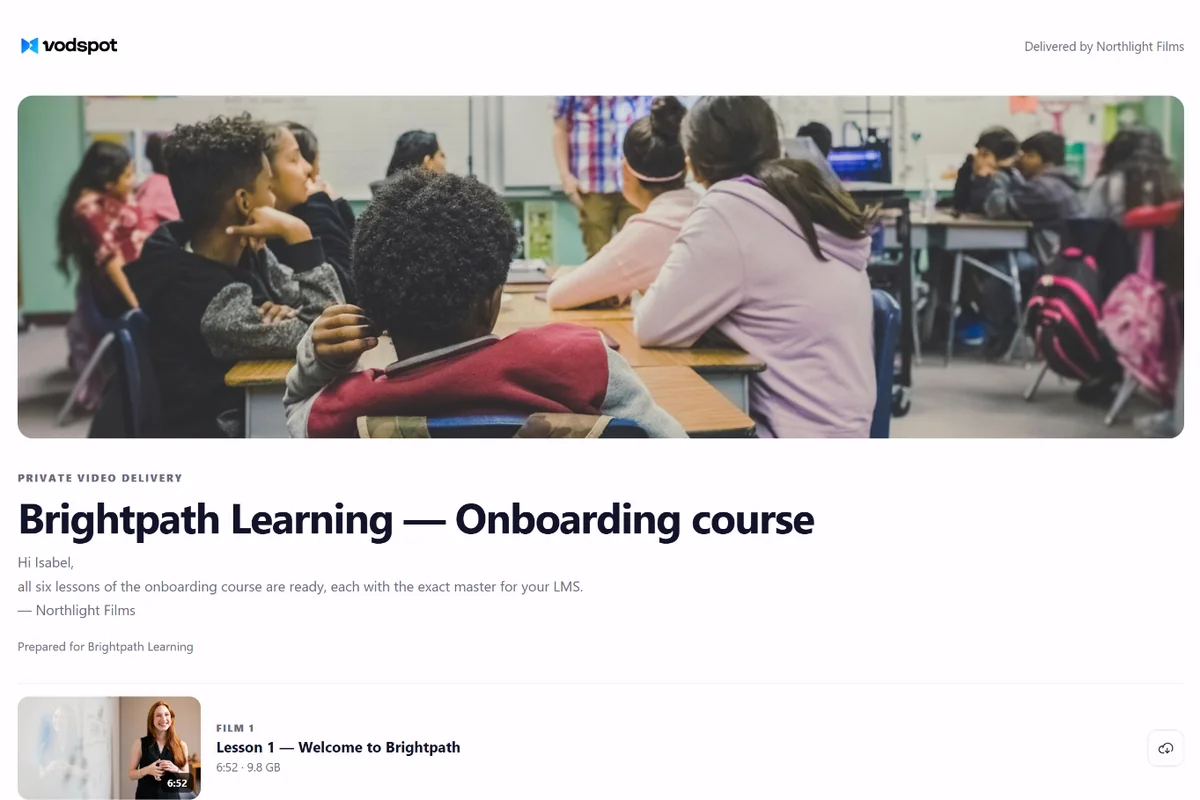
With a Frame.io alternative like VodSpot, the final goes out once. Approved videos go to the delivery page: a cover, a message to the client, all versions in order, and the exact originals with their original file names. There’s no proxy—the Download button delivers the exact file you exported. The restaurant manager clicks Play in 4K or downloads the master, and there’s nothing else to choose. We walk through the whole process, from export to handoff, in our guide to the video delivery workflow for freelancers.
Review is a conversation. Delivery is a premiere.
Team seats
Frame.io charges per member: Pro is $15 per member per month, Team is $25. Most people in this trade work alone or nearly alone. According to the U.S. Bureau of Labor Statistics, film and video editors and camera operators held about 72,000 jobs in 2025, and 35% of them were self-employed. For studios that size, every person you add to the account is another line on the bill.
A small team isn’t a phase to outgrow. In 2019, sociologists Lingfei Wu and James Evans of the University of Chicago and Dashun Wang of Northwestern University analyzed more than 65 million papers, patents, and software projects and published the results in Nature. Their conclusion: small teams tend to disrupt their fields with new ideas, while large teams develop existing ones. A two-person studio that has grown to ten is valuable precisely because it’s fast. Per-seat pricing shouldn’t slow it down.
Back to Marco and Leah. In two years, they’ve added two editors, a colorist, a motion designer, a producer, an account manager, and two assistants—ten people in all. Frame.io Pro tops out at five members, so they need Team: $264 per member per year, or $2,640 for everyone. Leah counted who actually comments on frames: three people. The other seven upload finals and send links.
Here’s the studio’s setup now: three editors handle agency review in Frame.io Pro ($156 × 3 = $468 a year), and the whole ten-person team works in VodSpot Studio ($1,490 a year) on client projects, finals, and delivery pages. Together, that’s $1,958 instead of $2,640: $682 less (−26%), and review stays where the agency wants it. If you don’t need frame comments at all, a Frame.io alternative for the whole team is Studio alone: $1,150 less (−44%).
VodSpot seats are included in the plan: 1 on Solo, 3 on Pro, 10 on Studio. Roles are Owner, Admin, Editor, and Viewer: the assistant publishes delivery pages but doesn’t touch billing, and the producer sees everything but can’t delete anything. There are no bandwidth fees: if a client forwards the link to forty managers, your bill stays the same.
Your team should grow through the work, not the pricing page.
Your name on the final
Frame.io lets you brand your shares: icon, header image, description, colors. That works well for review. But the page is still a Frame.io page, the invitation comes from Frame.io, and the pricing page doesn’t mention a custom domain at all.
A Frame.io alternative does the opposite at the delivery stage: only the studio is visible. In VodSpot, the delivery page carries your logo, colors, and font, one of five layouts—from a simple list to a full-screen “premiere”—and a cover built from your best shot. On Pro and Studio, the page opens on your own domain, for example films.yourstudio.com, and the “Powered by VodSpot” line can come off. You send the link yourself, from your own email: VodSpot drafts the message with notes on the password and expiry date. If viewer email sign-in is on, the access code reaches the client under the sender name from your branding.
For the restaurant chain, Marco and Leah built a single page for the whole campaign: videos in order, an expiry date at the end of the season, and downloads of the originals turned on. The marketing director forwarded the link to the managers, and Leah got an email when the page was first opened and another for every download. She no longer has to guess whether the finals got through. We ran the numbers in our article on the ROI of branded delivery.
Large originals aren’t a problem either: Studio takes files up to 100 GB, uploads them in parts, and picks up automatically after a dropped connection. For other ways to move a big master, see our guide on how to send large video files.
Clients don’t remember your edit timeline. They remember opening the finale.
To switch to a Frame.io alternative, you only need to move your finals. Review can stay where it is.
FAQ
Frame.io Pro costs $15 per member per month, or $156 per member per year, for up to 5 members. Team is $25 per member per month or $264 per member per year, for up to 15 members; beyond 15, there’s Enterprise on request. The free plan includes 2 members and 2 GB of storage. A Frame.io alternative with a different model is VodSpot: seats are included in the plan, 10 on Studio for $1,490 a year.
For review, it’s excellent: the client doesn’t need an account, and you can set a password and an expiry date and allow downloads. For the final delivery, VodSpot works better for the end client: a branded page on your own domain, the exact original with no “original or proxy” choice, and an email to you when the page is opened and when files are downloaded. The client doesn’t need an account for either.
Yes, in a limited form. The Frame.io for Creative Cloud page lists “two users,” up to 5 projects at a time, and 100 GB of storage; Pro, Team, and Enterprise are paid for separately. That’s rarely enough for final delivery, so studios add a delivery page such as VodSpot.
Yes, if the sender allows downloads: Frame.io’s help page says the Download button offers a choice between the original and a proxy. VodSpot skips that choice—the client always downloads the exact original with its original file name, and you get an email for every download.
Yes, and it’s the most common setup. Review and approvals happen in Frame.io, the final step in VodSpot: download the approved original, upload it to the client’s project, and publish the delivery page. Here, a Frame.io alternative is the next step, not a replacement.
No. VodSpot doesn’t have frame comments, drawings, versions, or approval statuses. That’s deliberate: VodSpot handles final delivery and storage. For frame-accurate review, stay with Frame.io.
VodSpot Studio is $1,490 a year for 10 seats. Frame.io Team for 10 members is $2,640 a year ($264 × 10), so VodSpot is $1,150 cheaper (−44%). For 3–5 people, Frame.io Pro is cheaper and gives more storage per person.
Download your finals from Frame.io: “⋯” menu next to the video → Download → original, not proxy. Upload them to the client’s project in VodSpot, a Frame.io alternative built for delivery. Create a delivery page with a cover, a password, and an expiry date, and send the link. The step-by-step guide is above on this page.
Guides
Client delivery
The best video delivery platforms for videographers, studios and agencies: 10 tools compared on client experience, original files, link lifetime, branding and real yearly cost.
Read the guideClient delivery
A practical final-mile checklist from upload and quality control to delivery, follow-up, and access cleanup.
Read the guidePrivate sharing
Choose the right access controls, package the viewing experience, and test every client path before you send the link.
Read the guideKeep exploring
Start with seven days and 5 GB. No credit card required.