A password until it airs
The client and the agency watch the spot before launch. Anyone else who gets the link sees only a password screen.
Commercial video delivery
One finished commercial is two dozen files: 60, 30, 15, and 6 seconds; 16:9 for broadcast and YouTube, 9:16 for Reels and TikTok, 1:1 for the feed; clean and subtitled versions. Commercial video delivery with VodSpot puts them all on a single private page: each version gets a clear name, plays in the browser in up to 4K, and has its own exact master. The link closes on the day the rights expire.
✓ 7-day free trial 5 GB included No credit card

The deliverables
Nathan directs commercials in Cincinnati. His spring campaign for a regional hardware store chain—Ohio, Kentucky, and Indiana—came out of the edit as a spreadsheet: four lengths, three formats, clean and subtitled versions. Twenty-four files. On Friday evening, the client’s media buyer messages him: “Which one is the 15-second vertical with subtitles? There are three that look the same.”
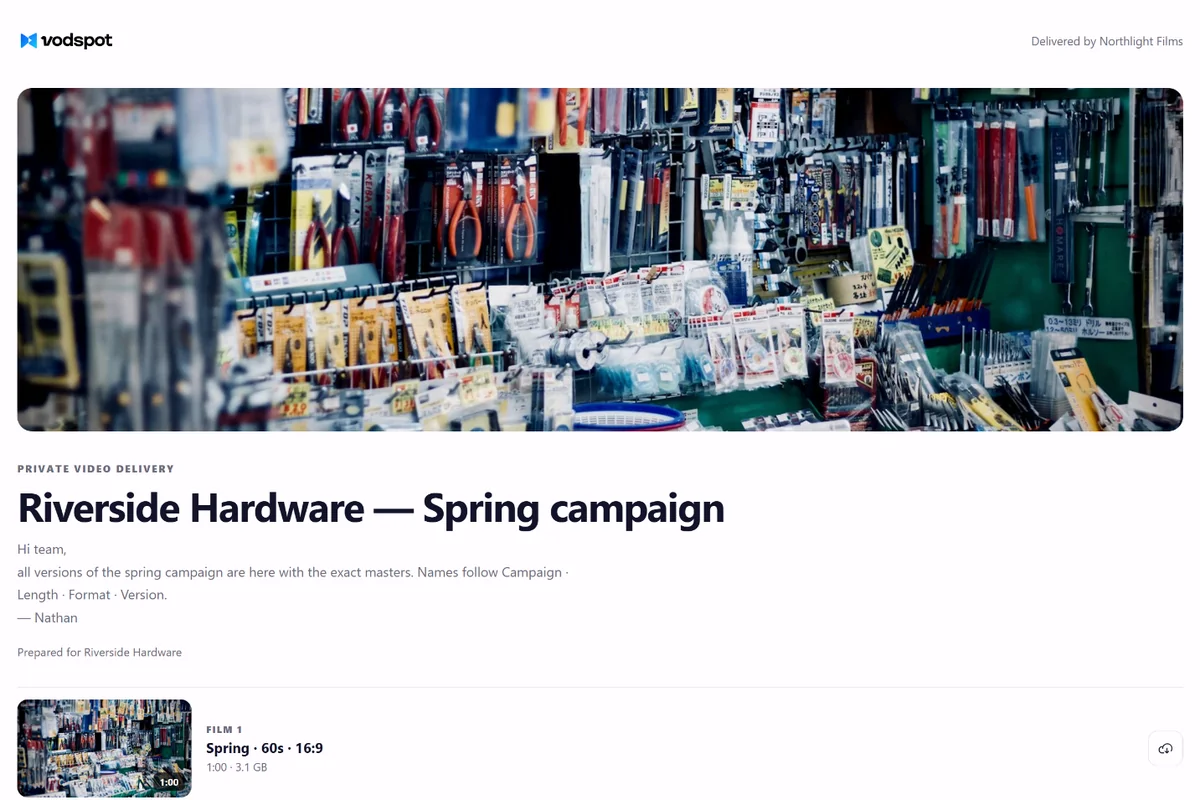
A folder of files like Spring_15_916_SUB_v3_FINAL2.mov makes sense only to the person who named them. On a VodSpot delivery page, each version gets its own title and description, with room for the length, format, market, and Ad-ID. Each version plays in the browser with no download, and the Download button returns the exact exported master with its original file name. You set the order: all the 16:9 first, then 9:16, then 1:1. One page holds up to 100 videos.
The client’s team watches, compares, and downloads without asking which link is the latest. Because there’s only one link.
Twenty-four files is normal. Twenty-four links isn’t.
One campaign in numbers
Links to send 24
Links to send 1
One link instead of 24
Our estimate: at about 50 Mbps for H.264 masters, all 24 versions together run 666 seconds, about 4.2 GB. That’s 2.8% of Solo’s storage (150 GB), or about $7 of the $240 a year. ProRes masters are much larger, and that’s fine too: a single file can be up to 50 GB on Solo and Pro, and up to 100 GB on Studio. The price depends on storage, not on how many times the media agency downloads a master. There’s no “download all” archive: each master has its own button. Twenty-four clicks—but one link, and no more “where’s the final one?”
Until it airs
The client and the agency watch the spot before launch. Anyone else who gets the link sees only a password screen.
Set the date and time the page closes on its own, and get a reminder three days before. If you unpublish the page, the link stops working at once, and open players stop within about a minute.
An email for every download, plus a log of which master was downloaded and when. With viewer email sign-in (Pro and above), you’ll also see exactly who.
Commercial video delivery, explained
Commercial video delivery is the final step of an advertising project. The approved versions go to the client, the media agency, and the platforms, so everyone can find their file, watch it before downloading, and get the exact master.
It sounds like “just send the files.” But think about review first. Nathan ran review in Frame.io, and it went smoothly. Frame.io has version stacks: a new version goes on top of the old one, and the player opens the latest right away. That’s ideal for editing—version 7 sits on top of version 6, and no one watches an outdated cut. Vimeo has a similar tool even on its Creator plan: “Unlimited review links, with custom expiration dates and customizable appearance.”
But once someone says “approved,” the stack turns into a grid. The twenty-four finals aren’t versions of one video; they’re twenty-four different files, each with its own destination. The six-second bumper goes to YouTube. The subtitled vertical goes to TikTok. The 30-second 16:9 goes to local TV.
That’s why Nathan has three delivery pages in his VodSpot project. The first is for the client’s marketing director: every version, preview only, no downloads. The second is for the media agency: the same 24 files with all the masters. The third is for the Spanish-speaking market: the page interface in Spanish and a Spanish caption track. Each page has its own link, password, and expiry date, and you can close one without touching the others.
VodSpot has no frame-by-frame comments, so Frame.io stays for the edit. Commercial video delivery starts where review ends. We walk through the whole process, from export to handoff, in video delivery workflow for freelancers.
Review is a stack. Delivery is a grid.
Cutdowns often get edited on the last night, after all the energy has gone into the hero spot. And it shows. But treating them as an afterthought is a mistake, and a costly one.
Kesten Newstead and Jenni Romaniuk of the Ehrenberg-Bass Institute compared 15- and 30-second TV commercials from Australia, the US, and the UK and published their results in the Journal of Advertising Research in 2010. A 15-second spot costs 60–80% as much airtime as a 30-second one. Yet it delivers about 80% of the longer spot’s recall and likability. And viewers identified the brand equally well with both. So every dollar spent on the short spot works just as hard, and often harder.
Nathan’s client knows this without any research: on local TV, the 15-second spot airs more often than the 60. For most viewers, the short version is the campaign.
In commercial video delivery, the short version doesn’t sit at the bottom of the list or in an “other” folder. It sits right next to the hero spot, with its own name, its own thumbnail (picked right in the player with “Pick a frame”), and its own master. If the client wants to compare the 30 and the 15, they open them one after the other on a single page, not in two tabs from two emails.
A cutdown isn’t a cut-down version. It’s the one that airs most.
In 2023, YouGov asked 1,000 American adults whether they turn on subtitles when watching TV in a language they know. Among those under 30, 63% preferred subtitles, and 23% always turned them on—versus 11% of those over 30. The reasons are telling too: a third of subtitle users (33%) watch somewhere noisy, and 22% don’t want to disturb others. The survey was about TV, not ads, but the habit carries over. People scroll their feeds on the bus and in line, surrounded by other people.
So a subtitled version isn’t a just-in-case extra. On VodSpot, each video can have up to 20 caption tracks in SRT or VTT: English, Spanish, and one for each market. The client switches them on in the player on the page, and the master stays clean. If a platform needs burned-in text, that’s a separate version and a separate line on the same page. How to prepare captions, and why they matter beyond accessibility, is covered in accessible video hosting and captions.
The same goes for vertical video. Mulier, Slabbinck, and Vermeir published a field study and two experiments in the Journal of Interactive Marketing in 2021. Vertical ads on a phone drew more interest and engagement than horizontal ones. The explanation is simple: you don’t have to turn the phone, so the ad is easier to take in. The effect was strongest among Gen Z.
So 9:16 isn’t a social media afterthought; it’s a full campaign format. In commercial video delivery, it belongs on the same page as the 16:9: the same order, the same kind of description, the same Download button for the exact original.
Your viewer holds the phone upright. Deliver the way they watch.
How long should a link stay live? That’s a question for the contract, not taste. If a spot uses performers under the SAG-AFTRA commercials contract, it has a Maximum Period of Use. The 2025 contract raised it to 24 months (from 21), and it now runs from a clear date: 10 business days after filming with on-camera performers begins. That’s how the Joint Policy Committee, the advertisers’ side in negotiations with SAG-AFTRA, explains it. And the JPC’s contract FAQ states plainly that unpaid use after the expiration date is “unauthorized use.”
Nathan’s spot uses SAG-AFTRA performers, and he shot in early March 2026. So the usage term ends in March 2028, and that’s the expiry date he sets on the media agency’s page. VodSpot will remind him three days before. That gives Nathan a reason to email the client: “If you renew the rights, I’ll renew the link.”
An expiry date won’t claw back masters that are already downloaded: the page closes, but the agency keeps its files. What you do get is a record of which master was downloaded and when, and with viewer email sign-in, exactly who. That’s the difference between “sent” and “we know they got it.” How to combine a password, an expiry date, and viewer email sign-in is covered in the password-protected video guide.
One more practical detail: commercial video delivery for two years means two years of subscription, because the link works only while the plan is active. On Solo, that’s $240 a year, or $480 for the whole campaign.
The usage term lives in the contract. The link expiry date lives in the page settings. Make sure they match.
Before you trust a service with a campaign, ask it eight questions:
With commercial video delivery on VodSpot, the first seven answers are “yes,” and the last one is “storage.” For campaigns where a pre-launch leak is expensive, the Studio plan overlays the viewer’s verified email on the video on the page, though not on downloaded masters. When that helps is covered in what is a video watermark. What VodSpot doesn’t have: frame-by-frame comments, a “download all” archive, DRM, or a public API. Prices are on the pricing page.
A good handoff is one after which no one follows up with “So where’s the final?”
FAQ
Put every version on one private delivery page, each with a clear name like “15s · 9:16 · Subtitled,” a browser preview, and an exact master to download. Add a password until launch and an expiry date that matches the usage term. That way, commercial video delivery replaces two dozen links with one.
Yes. Make a separate page for the media agency with downloads turned on: they get exact masters with their original file names. You get an email for every download, and with viewer email sign-in (Pro and above), you’ll see who downloaded.
Yes. The 9:16 and 1:1 versions sit on the same page as the 16:9 ones, play in the same player, and download as the exact original file, with no recompression.
Use one naming pattern for the whole campaign: “Campaign · Length · Format · Version,” for example, “Spring · 15s · 9:16 · Subtitled.” Put the market and Ad-ID in the video description. You set the page order with the arrows, so it’s easy to go from long to short within each format.
For as long as the rights last. For spots with performers under the 2025 SAG-AFTRA contract, that’s up to 24 months. Set that date as the page’s expiry date, and VodSpot will remind you three days before. The link works as long as your subscription is active; after it ends, everything is read-only for 14 days with public links paused, and then projects, videos, and delivery pages are deleted (the account stays).
Yes. Each video can have up to 20 caption tracks in SRT or VTT, with 66 languages to choose from. The client picks a track in the player, and the master stays clean. If a platform needs burned-in text, upload the version with burned-in subtitles as a separate video on the same page.
There’s no “download all” archive. Each master has its own button and downloads as the exact file with its original name. Twenty-four versions means twenty-four clicks, but you get one link and clear names instead of a folder of look-alike files.
No. VodSpot has no frame-accurate comments; for review, use Frame.io or Vimeo. VodSpot is for commercial video delivery after approval: exact masters, expiry dates, passwords, and download notifications. You’ll find a detailed comparison on the Frame.io alternative page.
Guides
Accessibility
Accessible video is mostly about a few good habits: accurate captions, a player you can use without a mouse and a transcript for people who prefer to read.
Read the guideVideo security
Passwords are one useful layer. Good private delivery also depends on expiry, revocation, clear communication, and sensible recipient access.
Read the guideClient delivery
A practical final-mile checklist from upload and quality control to delivery, follow-up, and access cleanup.
Read the guideCommercial delivery
Start with seven days and 5 GB. No credit card required.