Opens and views
An open counts once the viewer gets past the password or code. A view counts when the video actually starts playing, not when the page loads.
Video analytics
Private video analytics answer the three questions that start the moment a link leaves your inbox: did they open it, did they finish it, did they download it? VodSpot shows the answers for every video and every delivery page—and emails you when the client first opens the page and when they download the files.
✓ 7-day free trial 5 GB included No credit card

Metrics
An open counts once the viewer gets past the password or code. A view counts when the video actually starts playing, not when the page loads.
How many different people watched. Handy when a client forwards the link to colleagues: three viewers instead of one is a good sign. (Pro and above.)
Only real playback counts. Skipping to the end adds no minutes.
Who reached 90% or the end, who watched part of it, who just started — in one chart, plus the average completion. (Pro and above.)
Which file, from which page, and when. With email sign-in, also who.
When each page was last opened and its latest events. A page published more than a day ago and never opened shows up automatically in the “Needs attention” section of your dashboard.
Privacy first
Private video analytics in VodSpot exist so you can follow up at the right moment, not so you can build a file on your client. There are no ad networks or third-party trackers on delivery pages or in the player. We don’t store IP addresses: the country is resolved at the moment of viewing, and only the country is kept. Viewers never need an account.
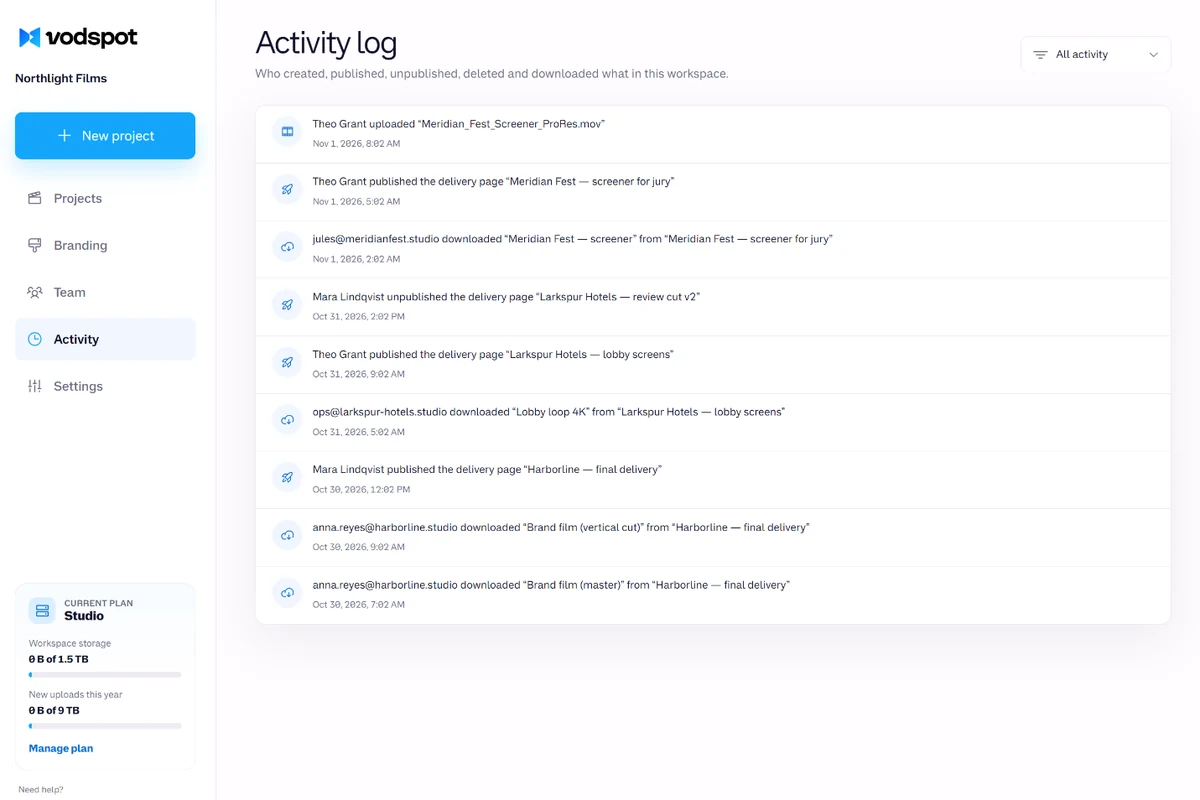
Names appear only where you ask for them. Enable email sign-in (Pro and above), and each viewer confirms their address with a one-time code—the form tells them up front that the sender will see their email. It’s a fair deal: you know who watched, and the viewer knows you know. On Studio, every client download and every team action lands in the activity log.
A counter the viewer knows about is courtesy. A counter they don’t know about is surveillance.
Use cases
Sam, an account manager at a Milwaukee agency, no longer asks “Did you get a chance to watch?” He sees the film was opened and watched to the end, and writes to ask for a testimonial instead.
The master was downloaded on Tuesday at 10:12 AM — it’s in the analytics, in your inbox, and in the Studio activity log. Handy when closing a project or sending the invoice.
Export views, completions, and downloads to CSV for 7, 30, or 90 days — per video and per delivery page (Pro and above).
Private video analytics, explained
Private video analytics are viewing statistics for a video meant for a few specific people, not the whole internet. The question isn’t “how many thousands?” but “did this particular person watch it?”
Meet Sam. He’s an account manager for a small agency in Milwaukee. On Friday, he sent a local brewery the final cut of its brand video—two minutes and forty seconds, four weeks of work. A week went by. Silence. The invoice is waiting for approval, the next project is waiting on feedback, and Sam keeps typing and deleting the same email: “Hi! Just wanted to check whether you’ve had a chance to see...”
The awkwardness here is real. In 2017, Roberto Hoyle, Apu Kapadia, and their colleagues presented a study of the “Seen” receipt in Facebook Messenger at the CHI conference. Of 368 senders, 326—almost nine out of ten—used it to tell who had received a message but hadn’t replied. And 201 of 294 recipients (68.4%) had deliberately avoided opening a message at least once so the sender wouldn’t see it marked “Seen.” The sender needs a signal. The recipient hates feeling watched.
Private video analytics address both needs. Here’s what Sam sees in VodSpot: the page was opened Monday morning; the video has three unique viewers, so the marketing director showed it to colleagues; average completion is 92%; and at 10:12 AM on Tuesday, the master was downloaded. The download email reached his inbox before he’d even checked the dashboard. The client wasn’t silent because they hadn’t watched. They watched it, shared it, took the files—and then simply got busy.
So Sam writes a different email: “Glad the video reached the team! Would you mind sharing a few words for our website?” We worked out what a testimonial like that is worth in our article on the ROI of branded delivery.
Don’t ask “did you watch it?” Ask “did you like it?”
Three numbers that often get mixed up answer different questions. Views: how many times someone pressed Play. Watch time: how many minutes the video actually played. Completion: how many people made it to the end.
YouTube shows how far apart these numbers can drift. In 2018, Siqi Wu, Marian-Andrei Rizoiu, and Lexing Xie of the Australian National University analyzed 5.3 million videos and compared two rankings: by views and by total watch time. Among the top 50 videos, the two rankings still partly agreed. Among the top 500, they barely matched at all: the correlation dropped to 0.08 (the paper was presented at the ICWSM conference). One of their examples is food blogger KEEMI: an average of 159,508 views per video, yet viewers watched only 18% of each one. A million views can just mean “hit Play and walked away.”
Client delivery works the same way, just on a smaller scale. Five views and one minute of total watch time on a three-minute video mean “opened it, clicked around, closed it.” One view at 100% means “watched closely.” That’s why private video analytics in VodSpot show all three numbers side by side and split viewers into three groups: watched to the end, watched part of it, and just started.
Take Sam: if all he saw was “3 views,” he wouldn’t know whether anyone watched the whole thing. An average completion of 92% and over seven minutes of total watch time—almost three full plays for three viewers—make it clear the client watched the video through instead of skipping to the end.
Views tell you someone opened the door. Watch time and completion tell you they came in.
Marketing analytics and private video analytics solve opposite problems. Marketing wants to know who a stranger on your site is and how to sell them more. Delivery needs to confirm that someone you already know got what they paid for.
Look at how marketing tools are built. Wistia draws a heatmap for every viewing session, and a click reveals the viewer’s “device (browser and environment), IP address, and the page where they played the media”—that’s the Business plan, $79 a month billed annually. Vidyard marks view notifications as “Available to users on all Vidyard plans,” and Video Insights as “Available to Vidyard Starter plans or higher”: viewer name, percentage watched, and city and country based on IP. Vimeo gives even free accounts reports by country, device, and embed site, and from Starter up it adds “Region/state and city-level analytics.” These are powerful tools, and they’re excellent for lead generation. There’s more on Wistia in our comparison of Wistia, Vimeo, and YouTube.
But your client isn’t a lead. People are already tired of being tracked: in 2023, the Pew Research Center surveyed 5,101 Americans, and 81% said they were concerned about how companies use the data they collect about them. And marketing email tracks all the time: in 2018, Steven Englehardt, Jeffrey Han, and Arvind Narayanan of Princeton examined 12,618 emails and found trackers in 70% of them (published in Proceedings on Privacy Enhancing Technologies).
YouTube Studio is the other extreme. Its key moments for audience retention report comes with a condition: “Your video should also be at least 60 seconds long and have at least 100 views.” A client delivery has three viewers. It will never reach a hundred views.
VodSpot counts what delivery needs, and nothing more. Pro, with detailed analytics and email sign-in, costs $590 a year—$358 (38%) less than Wistia Business at $948 a year.
Marketing asks, “Who are you?” Delivery asks, “Did you get it?”
A number is only as good as its definition. So here are the rules behind VodSpot’s private video analytics.
The last point matters more than it seems. Before sending, Sam opened the page four times, checking the cover, the password, and how it looked on his phone. His producer opened it twice more. Then Sam pasted the link into the team’s Slack channel, and Slack fetched the page to build a preview. Without filters, the client would have “watched” seven times before the email even reached them. In VodSpot, the page shows zero opens until the client actually opens it.
Embeds count too: views through /watch links and players on websites are tracked separately, and detailed analytics show which websites your player is embedded on. To embed a video privately, see our guide on how to embed private video on your website.
Your own checks are not your client’s views.
You judge private video analytics by a few questions, not by the length of the metrics list. Ask any service these:
If delivery is a process, analytics is its last step. We walk through the whole process in our video delivery workflow for freelancers, and the guide how to share videos privately with clients covers sending videos without the back-and-forth. To see which plan unlocks what, check pricing.
Sam has a new habit now: send the link, close the tab. The email will come on its own.
The best delivery analytics are the ones you don’t have to refresh every hour.
FAQ
Without email sign-in, you can see how many people watched, for how long, whether they finished, and their country and device—anonymously. Names appear when you enable email sign-in (Pro and above): each viewer confirms their address with a one-time code, and private video analytics show their opens, views, and downloads by email. Viewers never need an account.
Yes. VodSpot emails you on every download (no more than once every 6 hours for the same viewer), when the page is first opened after publishing, and three days before the link expires. Every Monday, you get a workspace summary if there were views or downloads that week. Each email can be disabled in the settings.
Yes. Solo includes views, downloads, and a table per delivery page: opens, views, downloads, and last opened. Pro and above add detailed analytics: unique viewers, completions, watch time, a daily chart, countries, devices, embed sites, and CSV export. The activity log comes with Studio. See the pricing page.
Yes. Views from embedded players and /watch links are counted alongside delivery page views, in a separate row. Detailed analytics also show which websites your player is embedded on.
Yes, on Pro and above. Export a CSV for 7, 30, or 90 days: per video (views, unique viewers, average completion, watch minutes, downloads, CTA clicks) and per delivery page. Column headers are in your interface language.
On Pro and above, you see the country (top 5), device type (desktop, phone, tablet, TV), and the websites where your embedded player was played. There’s no city: VodSpot doesn’t store viewers’ IP addresses.
A view is a fact: someone started the video. Watch time is how many minutes it actually played. Ten views of ten seconds each add up to less than two minutes of attention. That’s why private video analytics in VodSpot show both numbers next to completion—and skipping ahead adds no time.
Yes. Email sign-in isn’t sign-up: the viewer enters their address, receives a six-digit code, and watches. No password, no account. The form tells them up front that you’ll see their email. After that, you see who opened the page, when, how many times they watched, and what they downloaded (Pro and above). Learn more on the secure video sharing page.
Guides
Client delivery
A practical final-mile checklist from upload and quality control to delivery, follow-up, and access cleanup.
Read the guideResearch & Insights
Nobody has measured branded delivery directly. But it rests on things that are measured—and one extra project every few years already pays for it.
Read the guidePrivate sharing
Wistia, Vimeo or YouTube? A fair head-to-head: prices, free plans, ads, lead capture, analytics, privacy and original downloads — plus who should pick which, and when you need none of them.
Read the guideSee what happens
Start with seven days and 5 GB. No credit card required.