SproutVideo alternative

A SproutVideo alternative without bandwidth bills

SproutVideo is a reliable host for training and marketing videos. But once your library outgrows your plan, every extra gigabyte is billed, and the original is kept only if you turned on the right setting before uploading. VodSpot’s SproutVideo alternative is simpler: you pay for storage, bandwidth isn’t metered, and private hosting keeps the exact original of every video. Always.

  • No bandwidth or overage fees
  • Exact originals, always kept
  • Email sign-in from Pro
  • Your own domain from Pro

✓ 7-day free trial 5 GB included No credit card

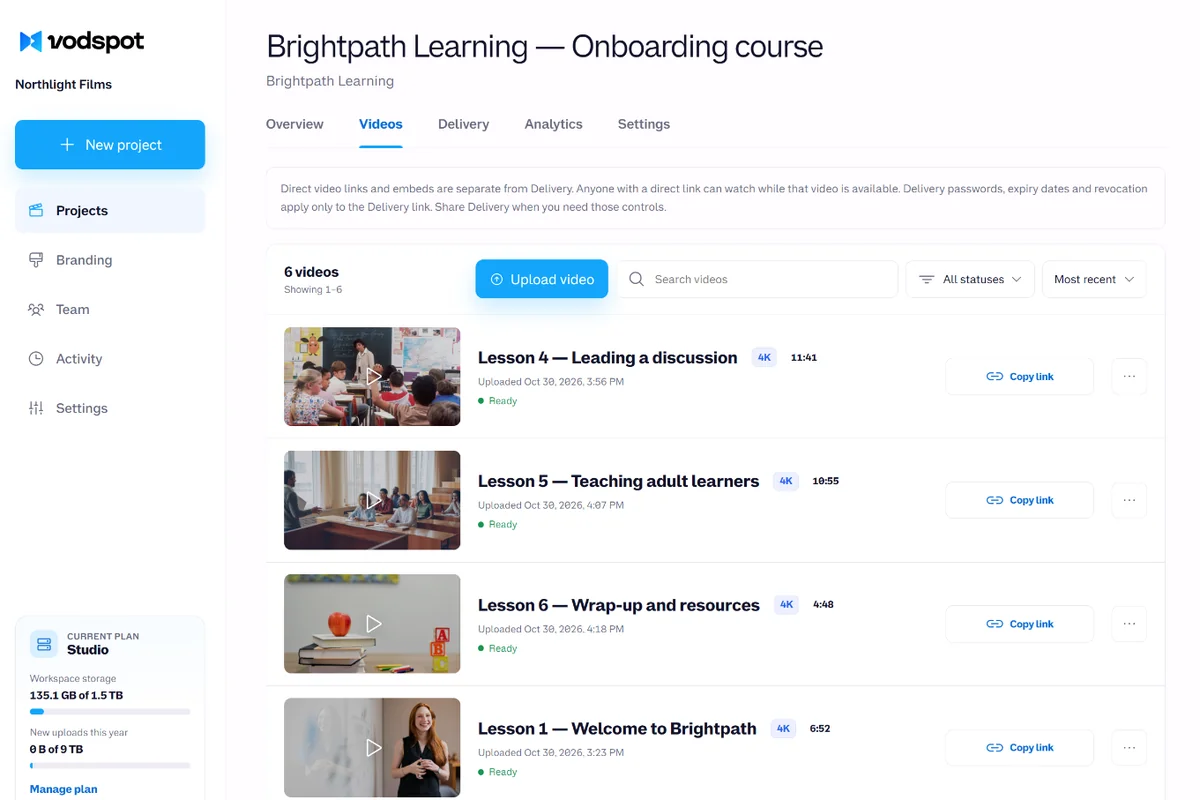
VodSpot project library holding a course’s lessons, each one streaming in 4K

SproutVideo is excellent for

  • Training and marketing videos with viewer login (from the Sprout plan);
  • Video websites with your own theme and playlists;
  • Live streams and webinars — live streaming comes with every plan;
  • Large teams: 50+ seats and viewer SSO on Forest;
  • Developers: SproutVideo has a public API.

It’s the wrong tool for

  • delivering the exact original if you didn’t turn on source storage before uploading;
  • a predictable bill when your library grows faster than your plan;
  • delivery pages for clients: a cover, a message, a download for each video, and an email to you when the files are downloaded.

SproutVideo was built for companies showing video to an audience. VodSpot was built for teams delivering video to people: clients, partners, students. If that’s your job, that’s where the SproutVideo alternative pays off.

What to choose

Choose VodSpot if:

  • your library is bigger than your included storage and you don’t want to pay for every extra gigabyte;
  • your client or partner should get the exact file you uploaded, not a transcoded copy;
  • you deliver work as pages: several videos, a cover, a message, a password, an expiry date, and email sign-in;
  • you need country restrictions without a $295 plan — we have them on Studio for $149.

SproutVideo is better if:

  • you stream live — VodSpot doesn’t;
  • you need a public video website with a theme, lead forms, and an API for your own integrations;
  • your team has more than 10 people, or your viewers sign in through corporate SSO;
  • your library is 1.5 TB or more and Tree fits you: $0.08 per gigabyte over the limit.

VodSpot vs. SproutVideo, side by side

Prices and features checked on the official pages on November 2, 2026.

VodSpot SproutVideo
Built for Private hosting and delivery of finished videos to clients and partners Business and marketing hosting, video websites, live streams
Monthly prices Solo $24 · Pro $59 · Studio $149 Seed $15 · Sprout $45 · Tree $95 · Forest $295
Annual prices $240 / $590 / $1,490 per year (2 months free) $12 / $35 / $72 / $195 per month, billed annually
Included storage 150 GB / 500 GB / 1.5 TB 150 GB / 400 GB / 1 TB / 2 TB
What counts toward storage Uploaded originals only; streaming copies up to 4K are free Two versions of each resolution, plus the original if you keep it
Bandwidth Free 1,800 GB / 4,800 GB / 12 TB / 24 TB included
Overage $0 for bandwidth; storage add-on: +250 GB for $25 per month $0.25 / $0.20 / $0.08 / $0.06 per extra GB of bandwidth or storage
Original file Always kept; downloads as the exact file with its original name Kept only if “Keep my original source video” was on before upload
Delivery page with several videos ✓ 5 layouts, cover, message, 6 languages Video website and playlists
Viewer login Email and one-time code: Pro — 400 viewers, Studio — 1,200 Viewer accounts: Sprout — 50, Tree — 200, Forest — 1,000+
Watermark with viewer data Studio, $149 (viewer’s email) Tree, $95 (email, IP, session ID)
Country restrictions Studio, $149 Forest, $295
Custom domain Pro and up: delivery pages, video links, embeds, and access-code emails sent in your name CNAME for video websites and landing pages
Team seats 1 / 3 / 10 2 / 5 / 10 / 50+
Live streaming —No ✓Yes
Public API —No ✓Yes
Free trial 7 days, 5 GB, no card required 30 days, no card required

The math

A SproutVideo alternative, in numbers: a 1.5 TB library

SproutVideo Sprout (monthly)

Sprout plan
$45 (400 GB included)
Storage over the plan: 1,100 GB × $0.20
$220
Bandwidth: within 4,800 GB
$0

Total $265 per month

VodSpot Studio (monthly)

Studio plan
$149 (1.5 TB, 10 seats)
Bandwidth fees
$0
Overage fees
$0

Total $149 per month

$116 less (−44%)

Assumptions: 1.5 TB as each service counts it (SproutVideo: every resolution’s copies plus kept originals; VodSpot: originals only); views stay within the included 4,800 GB; billed monthly. Over a year, the difference is $1,392. Honestly: on Tree, it’s $95 + 500 GB × $0.08 = $135, which is $14 (9%) cheaper than our Studio, and Tree also has 10 seats. Prices: sproutvideo.com/pricing and vodspot.tv/pricing, November 2, 2026.

Pricing model

Why teams look for a SproutVideo alternative: the gigabyte meter

Isabel runs video at a training company in Tampa. The company sells safety courses to construction contractors: short lessons, webinar recordings, footage shot on job sites. In four years, its SproutVideo library has grown to 1.5 TB. The team started on Sprout at $45, and the plan still covers everything they need except one thing: it includes 400 GB.

SproutVideo doesn’t lock anything. “We will never cap your storage on any plan,” its pricing page says, and that’s true: uploads never stop. Every gigabyte over the plan is simply billed at the plan’s rate—on Sprout, $0.20. For 1,100 extra gigabytes, that’s $220 on top of $45. The plan costs $45; the bill comes to $265.

There’s also a catch you only see in the help center. SproutVideo doesn’t count storage by the size of your files: during processing, it creates and stores “two versions of each resolution,” and if source storage is on, the originals are added on top. So your storage grows with every resolution SproutVideo encodes, not just with what you’ve uploaded.

As a SproutVideo alternative, VodSpot takes a different approach. Only the uploaded original counts toward your limit; streaming copies up to 4K, posters, and subtitles are on us. Bandwidth isn’t billed at all: a lesson watched by three thousand contractors costs the same as one opened by three. When your library grows, you add 250 GB for $25 per month—a price you know up front, not at the end of the month.

On VodSpot Studio, Isabel’s same library costs $149 per month: $116 less (−44%). And she gets ten team seats instead of five.

Your video bill should follow your library, not how well a lesson performs.

Originals

The one file you can’t export twice

This spring, Isabel’s partner, an industry association, asked for the original recording of a 4K seminar: they wanted to re-cut it for their trade show. Isabel opened the video in SproutVideo and found only transcoded versions. SproutVideo’s help center is upfront about this: in its example, the highest-quality file available is “the 1080p version.” The original is kept only if “Keep my original source video” is turned on in the account settings, and only for videos uploaded after that. Isabel’s setting was off. And if you turn it off later, the help center warns: “all your previously saved source video files will be permanently deleted.”

“No problem, the editor has the master,” Isabel decided. The master sat on the editor’s SSD. And here’s something few people think about until it happens to them.

In a 2016 study, Bianca Schroeder of the University of Toronto and Google engineers Raghav Lagisetty and Arif Merchant analyzed six years of SSD use in Google’s data centers—ten models, millions of drive days. Depending on the model, 20–63% of drives hit at least one uncorrectable read error. Those were data-center drives, watched over by engineers. An editor’s laptop lives a much rougher life.

Hard drives are no better. In 2007, Lakshmi Bairavasundaram of the University of Wisconsin–Madison and his colleagues at NetApp tracked 1.53 million drives over 32 months: 3.45% developed latent sector errors. “Latent” means the drive still works, but the sector holding your file can no longer be read, and you find out only when you open the file. Usually on the day you need it most.

A drive’s datasheet isn’t a guarantee either. In 2007, Bianca Schroeder and Garth Gibson of Carnegie Mellon University compared manufacturers’ promises with reality across about 100,000 drives: datasheets put annual failures at no more than 0.88%, but in practice 2–4% of drives were typically replaced each year, and in some systems up to 13%. And in 2008, Weihang Jiang and his colleagues from the University of Illinois at Urbana-Champaign and NetApp showed that disks themselves cause only 20–55% of storage subsystem failures. The rest breaks around them.

Isabel’s master was eventually found—on a third copy, after two days of searching. She got lucky.

With VodSpot, this story doesn’t happen. The original is always kept, with no setting to remember and no “too late to turn it on”: we never re-encode it, and we keep it separate from the streaming copies. On the delivery page, the client or partner clicks “Download” and gets the exact file with its original name. It’s your second copy, and it doesn’t live on someone’s laptop—the main reason teams choose a SproutVideo alternative that keeps originals by default. We covered why a cloud folder does worse at this in video hosting vs. cloud storage.

You can make another encode any day. You only get one original.
Access and protection

Viewer login, watermarks, and geo: a SproutVideo alternative that doesn’t make you chase the top tier

Isabel’s courses aren’t for just anyone: they’re for the contractors who paid for them. So viewer login matters more to her than a showcase—and this is where a good SproutVideo alternative should be simpler, not pricier.

SproutVideo’s viewer login starts on Sprout, capped at 50 viewer accounts; Tree allows 200, Forest 1,000+. VodSpot gives you email sign-in from Pro at $59: the viewer enters their address, gets a six-digit code, and watches. Pro includes 400 viewers and Studio 1,200, and a viewer invited to three pages still counts once. You see who opened the page and who downloaded the file.

SproutVideo offers country restrictions on Forest at $295 per month. VodSpot has them on Studio at $149: $146 less (−49%). For a training company whose course licenses are valid only in the US, that’s no small thing. This is where the SproutVideo alternative saves you the most.

Where SproutVideo is honestly cheaper is watermarks. Its dynamic watermark with email, IP, and session ID comes with Tree at $95; ours comes with Studio at $149. Our watermark is the viewer’s verified email, floating across the frame, full screen included. It isn’t applied to downloaded originals, so partners get a clean master. We covered how to pick the right watermark for the job in what is a video watermark.

One more difference. Contractors watch lessons on the company’s website, while Isabel sends partners delivery pages: a cover, a message, several videos, an expiry date, a download button for each file, and an email to the team when the partner downloads the recording. Embeds play only on domains from your list, and that’s included on every plan. To embed a private video in a course so no one can copy it to another site, see how to embed a private video on your website.

Analytics shows where your videos are watched: views, completions, countries, devices, and the sites embedding them, with CSV export from Pro. We don’t store viewers’ IP addresses.

Pay for the access you need, not for the tier it’s hidden in.

Switching

How to switch from SproutVideo to VodSpot

Switching to a SproutVideo alternative isn’t a one-click import; it’s seven calm steps. The first one matters most.

  1. Find the best copies. If “Keep my original source video” was on when you uploaded a video, you can download the original with the “Download” button on the video’s settings page in SproutVideo. If not, only transcoded versions are there, and you’re better off taking the master from your archive.
  2. Start with the free trial. 7 days, 5 GB, no card required: upload one course module, create a delivery page, and test the embed on your website.
  3. Pick a plan by the size of your originals. On a monthly plan, you can upload your full storage in the first paid month: on Studio, all 1.5 TB at once. On an annual plan, you get six times your storage for the year. Files can be up to 50 GB on Solo and Pro, and up to 100 GB on Studio.
  4. Organize videos into projects. One project per course or client. Uploads go in parts and resume automatically after a dropped connection.
  5. Move subtitles and chapters. Subtitles — SRT or VTT, up to 20 tracks per video; chapters — as “0:00 Title” lines.
  6. Replace the embeds. Add your domains to the allowed list and swap the embed codes in your LMS and on your website. Keep SproutVideo running until every code is swapped.
  7. Send delivery pages to partners. With a password or email sign-in (Pro and up), an expiry date, and downloadable originals. Once every link works, close your SproutVideo account.

The move takes a weekend. The predictable bill stays.

FAQ

Frequently asked questions

What is the best SproutVideo alternative?

It depends on the job. If you deliver videos to clients, partners, or students, the best SproutVideo alternative is VodSpot: the exact original is always kept, bandwidth is free, and delivery pages are protected by a password or email sign-in. For public audiences and business showcases, see our roundup of the best private video hosting platforms for business.

Does SproutVideo charge for bandwidth?

Yes, beyond what’s included. SproutVideo plans include from 1,800 GB of bandwidth (Seed) to 24 TB (Forest); every gigabyte over the limit costs $0.25, $0.20, $0.08, or $0.06, depending on the plan, and the same rate applies to storage. VodSpot doesn’t charge for bandwidth: you pay only for storage.

How much does SproutVideo cost?

As of November 2, 2026, monthly: Seed $15, Sprout $45, Tree $95, Forest $295; billed annually: $12, $35, $72, and $195 per month. Beyond the included storage and bandwidth, you pay per gigabyte. VodSpot: Solo $24, Pro $59, Studio $149 per month; two months free with annual billing.

Can I download original files from SproutVideo?

Only if “Keep my original source video” was on before you uploaded the video: the setting applies to new uploads, and turning it off deletes the saved originals. Transcoded versions are available without it. VodSpot always keeps the original, and it downloads as the exact file with its original name—for you and, if you allow it, for your client.

Does SproutVideo support viewer login?

Yes, from the Sprout plan: 50 viewer accounts on Sprout, 200 on Tree, and 1,000+ on Forest; SSO on Forest. VodSpot offers email sign-in with a one-time code from Pro at $59: 400 viewers on Pro and 1,200 on Studio.

Does SproutVideo have a custom domain?

Yes, for the video website and landing pages: you point your domain with a CNAME. VodSpot includes a custom domain on Pro ($59) and Studio ($149): it serves delivery pages, video links, and embeds, and access-code emails go out in your name.

Is VodSpot cheaper than SproutVideo?

Usually, once your library outgrows the plan—which is why people most often look for VodSpot as a SproutVideo alternative. 1.5 TB on Sprout costs $45 + $220 overage = $265 per month; on VodSpot Studio it’s $149: $116 less (−44%). But honestly, the same 1.5 TB on Tree costs $135, which is $14 (9%) less than our Studio. For a smaller library, Seed at $15 is cheaper.

Does VodSpot have live streaming?

No. VodSpot hosts finished videos: uploads, streaming up to 4K, delivery pages, and original downloads. If you need live streams and webinars, SproutVideo handles them, and you can then share the recordings with partners through VodSpot.

How do I move from SproutVideo to VodSpot?

Take the originals from SproutVideo (if source storage was on) or the masters from your archive, upload them project by project—on a monthly plan, you can upload your full storage in the first paid month—then swap the embed codes. All the steps are in the section above.

Guides

Go deeper on the blog

Education

Best Video Hosting for Online Courses in 2026

The best video hosting for online courses in 2026: 8 platforms compared on price, bandwidth, domain-locked embeds, captions and DRM — plus what course video really costs per month.

Read the guide

Keep exploring

Ready to deliver your next project?

Start with seven days and 5 GB. No credit card required.